SocialFlame UK — Resources
Browse and download resources shared by your network.
SocialFlame Code of Conduct for all creators and managers.
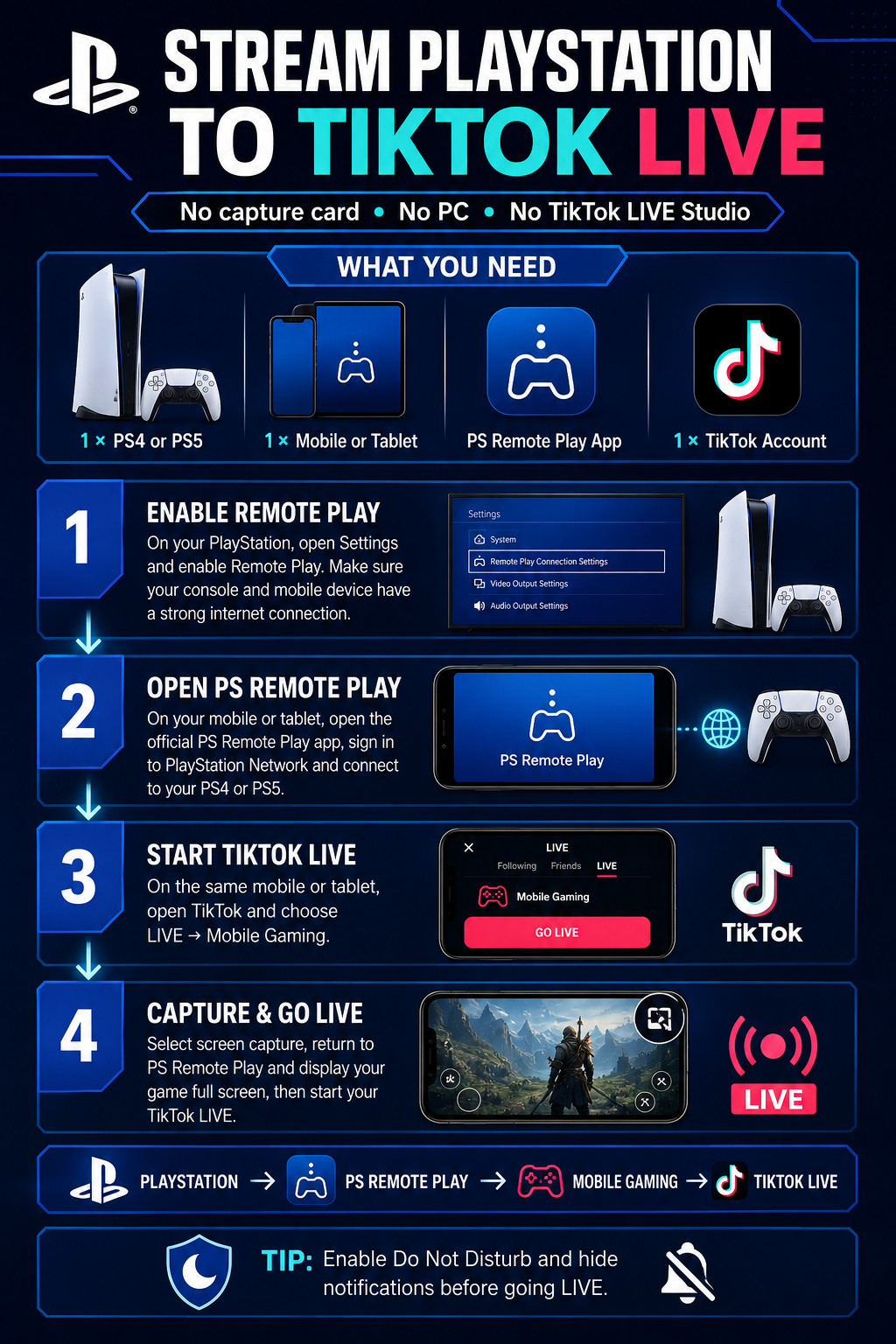
You can stream PS4 or PS5 gameplay to TikTok LIVE using the official PS Remote Play application and TikTok’s Mobile Gaming feature. You will not need a computer, capture card or TikTok LIVE Studio.
WHAT YOU NEED
• 1 × PS4 or PS5 console
• 1 × mobile phone or tablet
• The official PS Remote Play application
• 1 × PlayStation Network account
• 1 × TikTok account with LIVE and Mobile Gaming access
• A stable internet connection
STEP 1: ENABLE REMOTE PLAY
On your PlayStation, open Settings and locate the Remote Play settings.
Enable Remote Play and make sure your console is connected to the internet. Your mobile device must also have a strong internet connection.
If you want Remote Play to connect while the console is in Rest Mode, enable the appropriate network and power settings on your PlayStation.
STEP 2: SET UP PS REMOTE PLAY
Install and open the official PS Remote Play application on your mobile phone or tablet.
Sign in using the PlayStation Network account connected to your console. Select your PS4 or PS5 and wait for the application to establish a connection.
STEP 3: CHECK YOUR GAMEPLAY
Start the game you want to broadcast.
Confirm that the gameplay picture, controls and sound are working correctly through PS Remote Play. Switch the Remote Play display to full-screen mode where possible.
STEP 4: START A MOBILE GAMING LIVE
On the same mobile phone or tablet, open TikTok.
Tap the Create button, select LIVE and choose Mobile Gaming. Add your LIVE title and configure your audience and moderation settings.
STEP 5: ENABLE SCREEN CAPTURE
Start TikTok’s screen-capture broadcast when prompted.
Return to the PS Remote Play application and display your game in full-screen mode. TikTok will capture your device’s screen and broadcast your PlayStation gameplay.
IMPORTANT TIPS
• Enable Do Not Disturb before starting to prevent private notifications from appearing.
• Hide notification previews and close private applications.
• Keep your mobile device connected to a charger.
• Use a strong 5 GHz Wi-Fi or wired console connection for better performance.
• Wear headphones to reduce echo and audio feedback.
• Test your Remote Play connection before beginning your TikTok LIVE.
• Remote Play performance will depend on the speed and stability of your network.
PlayStation → PS Remote Play → TikTok Mobile Gaming → TikTok LIVE
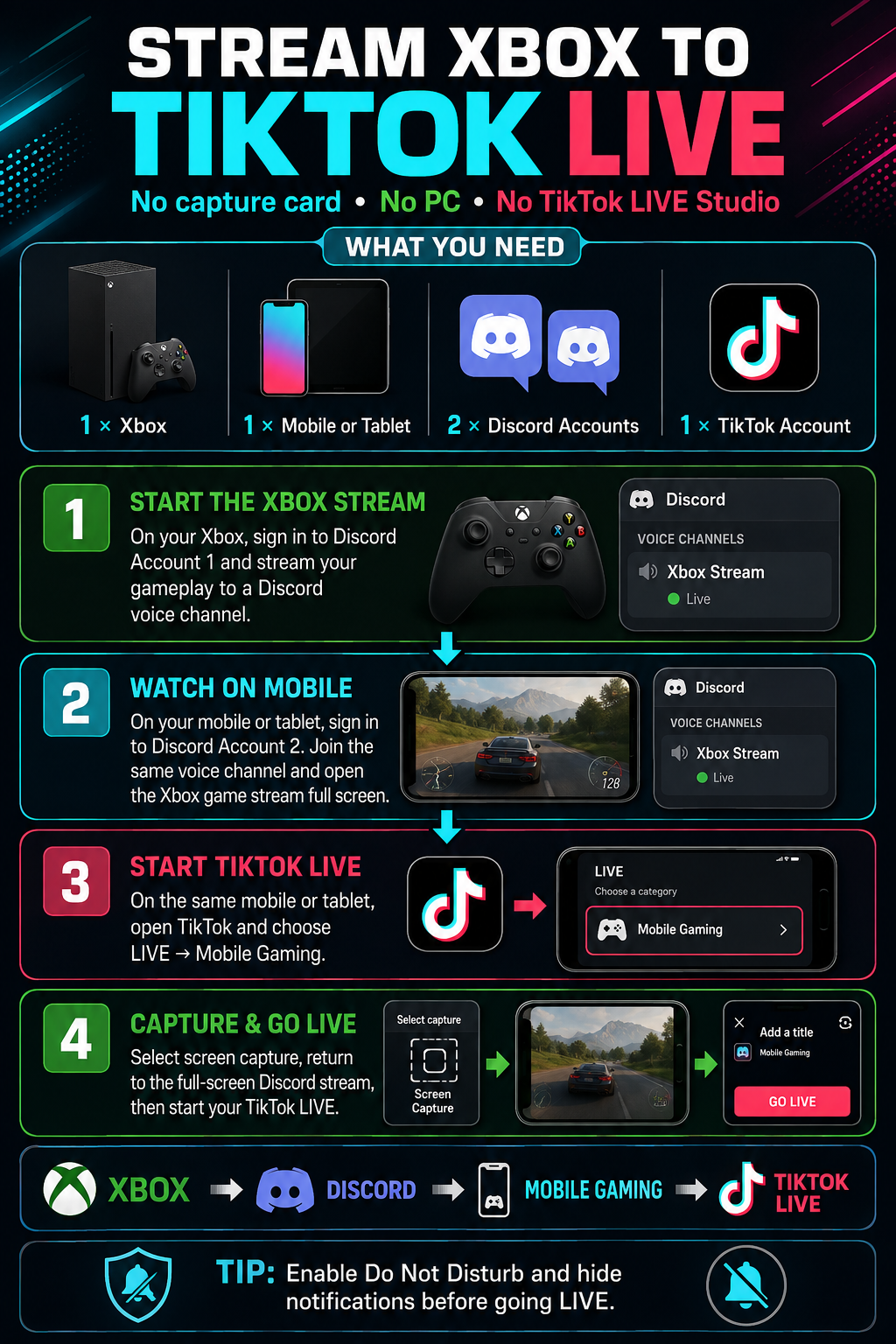
You can stream gameplay from your Xbox directly to TikTok LIVE using Discord and TikTok’s Mobile Gaming feature. You will not need a computer, capture card or TikTok LIVE Studio.
WHAT YOU NEED
• 1 × Xbox console
• 1 × mobile phone or tablet
• 2 × Discord accounts
• 1 × TikTok account with LIVE and Mobile Gaming access
• A stable internet connection
STEP 1: PREPARE DISCORD
Sign in to Discord Account 1 on your Xbox.
On your mobile phone or tablet, sign in to Discord Account 2. Both Discord accounts must be able to join the same server and voice channel.
STEP 2: STREAM YOUR XBOX GAMEPLAY
Open the Discord integration on your Xbox and join the required Discord voice channel using Account 1.
Select the option to stream your Xbox gameplay to the Discord channel. Start the game you want to broadcast and confirm that the gameplay stream is running.
STEP 3: WATCH THE STREAM ON MOBILE
Using Discord Account 2 on your mobile phone or tablet, join the same voice channel.
Open the Xbox gameplay stream and switch it to full-screen mode. Check that the picture and game audio are working correctly.
STEP 4: START A MOBILE GAMING LIVE
On the same mobile phone or tablet, open TikTok.
Tap the Create button, select LIVE and choose Mobile Gaming. Add your LIVE title and make any necessary audience or moderation adjustments.
STEP 5: ENABLE SCREEN CAPTURE
Start TikTok’s screen-capture broadcast when prompted.
Return to Discord and reopen the Xbox gameplay stream in full-screen mode. TikTok will broadcast what appears on your device’s screen, allowing viewers to watch your Xbox gameplay.
IMPORTANT TIPS
• Enable Do Not Disturb before starting to prevent private notifications from appearing on your LIVE.
• Hide message previews and close any private applications.
• Keep your mobile device connected to a charger.
• Use a strong Wi-Fi or wired internet connection wherever possible.
• Wear headphones to reduce echo and audio feedback.
• Test the stream privately or with a moderator before running a full LIVE.
Xbox → Discord Account 1 → Discord Account 2 on mobile → TikTok Mobile Gaming → TikTok LIVE
Appeal form for Age Restrictions on a creators TikTok account. Only use this if the in-app ID fails or is rejected.
This training teaches TikTok LIVE agency managers and creator networks how to help creators stream safely, protect their earning ability, and remain eligible for the For You feed.
It covers:
- LIVE Monetization Guidelines: how they differ from Community Guidelines and what can lead to gifting bans or feature restrictions.
- Gifts and engagement: recognising manipulative gift requests, misleading incentives, automated interactions, and “grow party” activity.
- Content safety and quality: avoiding sexualised content, copyright violations, low-interaction streams, static images, and inappropriate involvement of minors.
- Creator coaching: encouraging original, entertaining content and genuine audience interaction to support long-term growth.
Follow this guide to get on the right path to earn TikTok Pro.
There are two main methods, depending on whether the game is on a phone or on a PC/console.
Slideshow on how to use the TikTok app for creators who are new to going LIVE.
TikTok Box Battle game plan and instructions.
Plain English Guide to TikTok LIVE Rules & Community Guidelines
We do not allow showing, promoting, or engaging in adult sexual or physical abuse or exploitation. This includes non-consensual sexual acts (rape/molestation), image-based sexual abuse (providing instructions on how to create or access intimate images of an individual without their consent), sextortion (a threat to share intimate content to get money, etc.), physical abuse, and sexual harassment.
Sexual harassment is unwanted sexual communication or behavior directed at a person. This includes sexualization through the platform (such as imitating a sexual act through a duet or a sticker), making statements about intimate body parts or sexual performance, or sharing or threatening to share information about a person's sexual life (such as sexual history or partners, or sexual orientation).
NOT ALLOWED
Showing, promoting, or engaging in:
- Non-consensual sexual acts, image-based sexual abuse, or physical abuse (domestic violence)
- Sexual harassment
- Sextortion
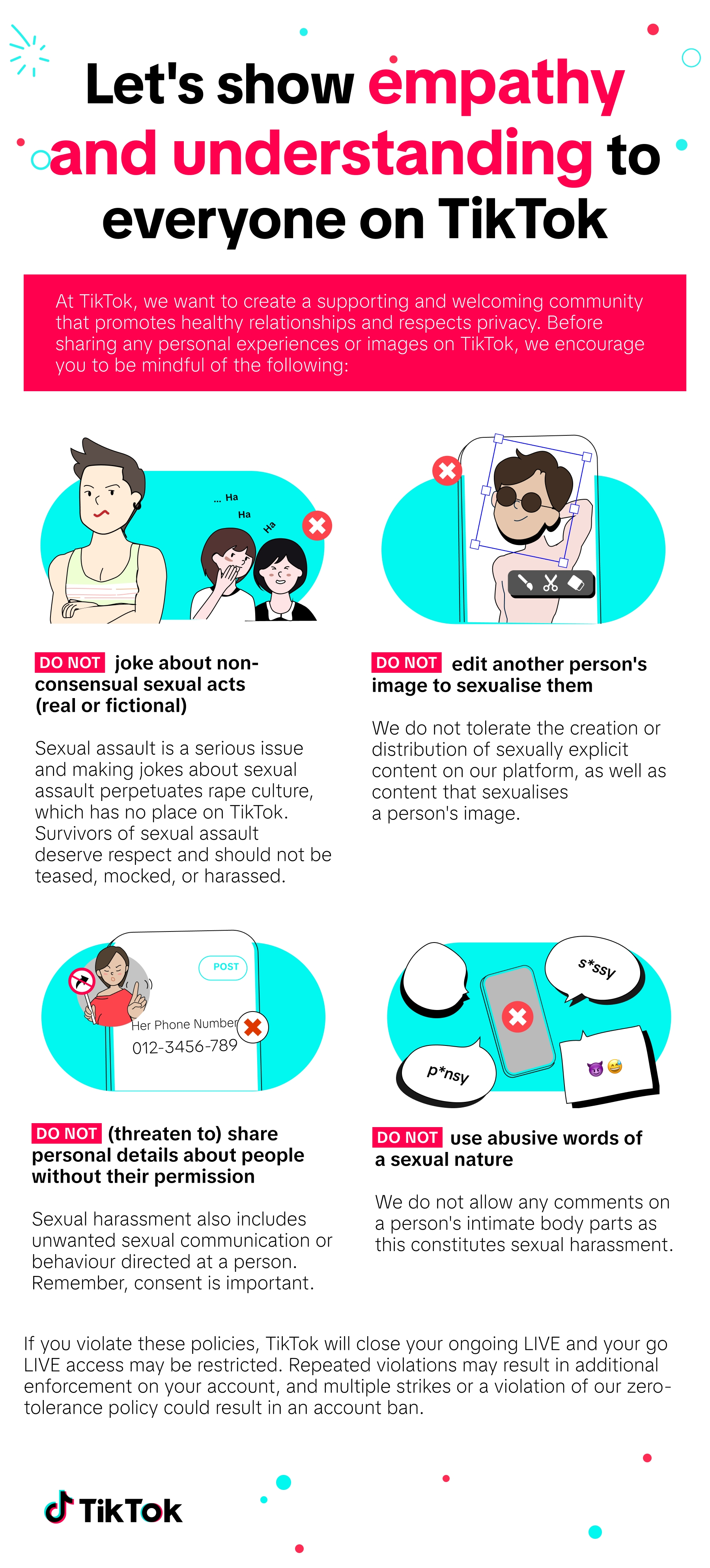
We do not allow content by young people that intends to be sexually suggestive. This includes intimate kissing, sexualized framing, or sexualized behavior. We also do not allow sexually explicit language by anyone. We do allow some artistic content with sexual references, such as song lyrics.
We work with regional experts and local communities to help ensure that our global approach considers the way harms are experienced across regions.
NOT ALLOWED
- Using sexually explicit language, such as graphic descriptions of sexual acts or arousal, e.g. Like what you see, sounds (such as moaning) , and with sexual explicit language in the profile, hashtag, title, etc.
Showing young people engaging in:
- Intimate kissing, such as kissing that includes closed or open mouths, tongues, biting, sucking, or groping
- Sexualized framing, such as cropping or magnifying an image, adding a digital effect (including a sticker or arrow), or bending over to draw attention to intimate body parts
- Sexualized behavior, such as repetitive breast or buttocks shaking or pelvic thrusting, striptease, fondling clothed intimate body parts, or licking phallic-shaped objects while making sounds or facial expressions that imply sexual arousal
Elections are important events that often spark lively conversations and debate. We aim to respect these discussions while ensuring TikTok remains a space that brings people together. We welcome informed civic conversations, but draw the line at content that could mislead voters or cause real-world harm. That includes misinformation that could prevent people from voting, interfere with elections, or encourage the unlawful disruption of results.
We classify eligible political TikTok accounts as Government, Politician, and Political Party Accounts and apply a set of policies that prevent the use of certain features. These accounts aren't allowed to participate in incentive programs or creator monetization features.
We also don't allow paid political advertising. This includes creators being compensated for making branded political content, and the use of other promotional tools on the platform, such as Promote. We prohibit advertising of any kind by political figures and entities, and suspected paid political advertising is ineligible for the For You feed. However, eligible government entities may advertise in specific, approved categories—such as public health and safety information, tourism, and culture—after completing a certification process. Additionally, official electoral management bodies may run informational ads about election processes.
To help you manage your TikTok experience, we may add warning labels to content that our fact-checking partners cannot verify.
When you're driving, do not:
- Host a LIVE
- Interact with a passenger's LIVE, such as posing and checking the screen
- Promote or exhibit dangerous driving behavior, such as exceeding the speed limit, running a red light or performing motor vehicle stunts without the necessary skills, equipment and safety gear
If you're a passenger hosting a LIVE, please do not
- Distract your driver, including encouraging the driver to interact with LIVE
- Position the camera in a way that obstructs the driver's view
- Engage in any other behaviors that could risk the safety of yourself or others
We do not allow the facilitation or marketing of gambling or gambling-like activities.
Gambling is betting money (including digital currencies, such as bitcoin) or something of monetary value on an event with an uncertain outcome, for a financial gain.
Gambling-like activities means activities that do not rise to the level of gambling, but are similar in behavior and carry similar risks, such as social casinos and gambling-related software.
NOT ALLOWED
- Facilitating gambling or gambling-like activities, such as providing a link to a gambling service
- Marketing of gambling or gambling-like activities, such as encouraging people to visit a website or providing a link
We do not allow harassing, degrading, or bullying statements or behavior. This includes responding to such acts with retaliatory harassment. We do allow some negative or critical comments or images about public figures. However, we still remove content that violates other policies (such as violent threats, hate speech, or sexual exploitation), as well as serious forms of harassment (such as doxxing or expressing a desire that someone experience serious physical harm).
NOT ALLOWED
- Degrading an individual who has experienced physical distress, or on the basis of their personal appearance, intelligence, or personal circumstances (such as hygiene, or health or medical history)
- Showing someone being physically bullied by another person or group
- Degrading or revictimizing people who have experienced a tragedy, such as claiming that they deserved it or belittling or denying their experience
- Undermining an individual's physical safety, by threatening them, or expressing a desire for them to die, get a serious disease, or experience some other severe physical harm
- Threatening or inciting others to doxx or blackmail someone, or to share or hack account information
- Inciting others to harass a person, or promoting coordinated harassment, such as advocating for people to post comments with abusive language, or to maliciously report an account
We do not allow any hate speech, hateful behavior, or promotion of hateful ideologies. This includes explicit or implicit content that attacks a protected group. Here are some guidelines to help you avoid that:
- Do not demean, degrade, or use hateful slurs associated with or that may claim supremacy over a group of people based on their protected attributes.
- Protected attributes include national origin, ethnicity, religion, sexual orientation, caste, gender identity, disability, and immigration status, etc., of a person or group.
- Respect the diversity of the global TikTok community and use LIVE matches as a channel to positively promote cultural characteristics.
A guide to going LIVE on TikTok and a check list.
Learn the 3-Step TikTok System to Get Views & Clients (even with a small audience).
Rules and regulations relating to creator poaching on the TikTok platform.
Learn how to use the LIVE Now features on Backstage.
Learn how to manage and teach creators to have their own style of content.
Safeguarding at SocialFlame exists to actively protect children (anyone under 18) and adults at risk from harm, abuse, exploitation, or neglect that could arise through:
Learn how to scout creators and manage the entire process
A walk-through of the TikTok LIVE Backstage platform for team / agency owners.